The ClassCAD Product Landscape

Four websites, one product
Our customers meet four websites: classcad.ch, classcad.ai, buerli.io and buerligons.io. This post explains how they belong together.
ClassCAD is the CAD engine. ClassCAD.ai is the tool with which AI agents model on it and write code. Buerli is the free SDK for your own applications, and Buerligons the finished CAD application. ClassCAD PDM for versioning and release is coming. You pay only for the engine, never for the SDK, the AI tools or Buerligons on Free.
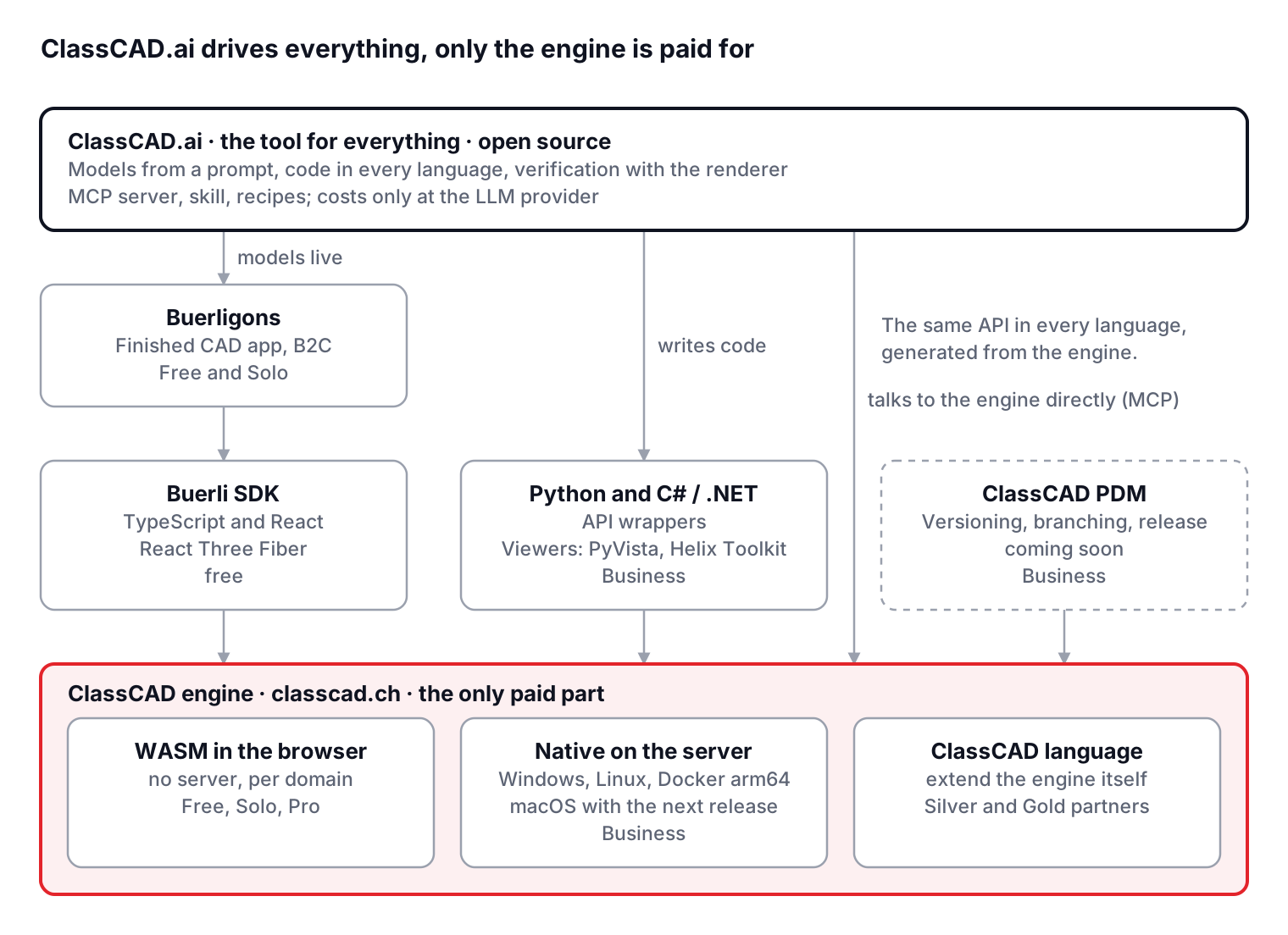
ClassCAD.ai sits above everything: agents model live in Buerligons, write Buerli, Python and C# code, and talk to the engine directly over MCP. Every arrow means "works with" or "builds on"; only the bottom layer costs anything.
| Site | What it is | For whom | Cost |
|---|---|---|---|
| classcad.ch | The CAD engine: modelling kernel, headless, WASM and native | Companies that build CAD into their own products (B2B) | Plans Solo, Pro, Business; partnerships |
| classcad.ai | The most important tool: AI agents build models from a prompt, write code in every language, verify geometry | Everyone: users, developers, partners | Open source, only LLM costs at the provider |
| buerli.io | The SDK for custom CAD in TypeScript, viewer with React Three Fiber | Developers of their own CAD applications | free |
| buerligons.io | The finished CAD application, built with Buerli | Users (B2C), reference for Buerli developers | Free and Solo |
| ClassCAD PDM | Managing the models: versioning, branching, release (coming soon) | Teams that manage models professionally | Part of Business |
ClassCAD: the engine
ClassCAD is the core everything else builds on: a parametric, history-based CAD engine with part features, a sketcher with 2D constraints, assemblies with 3D constraints, drawings and export. It runs without a user interface (headless) and is driven through an API that is generated from the system classes with every release: the same methods in TypeScript, Python and .NET.
The engine comes in two modes:
- WebAssembly (WASM): runs in the user's browser, without a server. Enabled for the domains the customer registers in their account. This is the engine behind Buerligons and behind web apps built with Buerli.
- Native: runs as a server process on Windows or Linux (x64, arm64), also as a Docker image for arm64; macOS follows with the next release. Clients connect over a socket, the server starts one engine per session. For backends, automation, PDM workers and the Python and C# bindings. From the Business plan.
The engine is the only place where money changes hands: through the plans Solo, Pro and Business, or through a partnership contract. Everything built on top of the engine is free or open source.
ClassCAD.ai: the tool for everything
ClassCAD.ai is the most important entry point to the whole family: AI agents such as Claude or ChatGPT model with ClassCAD. Plain language in, verified geometry out. The agent builds models from a prompt, writes the matching code in every language of the family (TypeScript with Buerli, Python, C#), checks its result with the renderer and exports STEP or STL.
What it consists of:
- MCP server: connects the engine to the agent. Every session has a live Buerligons view, where the user watches and works along.
- Skill and recipes: proven procedures for typical tasks, such as constrained sketching, parametric parts, assembly parameters, patterns and verification.
- Renderer: views of the model with which the agent checks its result against the drawing or the specification.
All of it is open source. Costs arise only at the LLM provider (OpenAI, Anthropic and others) for the AI usage itself, not with us. The recipes and the skill are made to simplify the use of ClassCAD with AI for our customers; because the code is open, every customer can add their own harnesses or specialised skills for their domain.
Buerli: the SDK
Buerli is the free JavaScript and React SDK for the ClassCAD engine. With it a development team builds its own CAD application for its niche: a configurator, a tooling modeller, a product editor, embedded in its own web app or on its own server.
Buerli has three layers:
- Client and API: the connection to the engine (WASM in the browser or native over a socket) and the typed API,
api.v1.<domain>.<method>, with the same names on every runtime. - Headless model: the state of parts and assemblies in the browser, without rendering, for your own user interfaces.
- Visualisation and interaction: ready-made components for React Three Fiber, that is three.js in React. Geometry, selection, sketcher, feature tree and dimensions are drawn into your own 3D scene. This layer is the most developed client in the family.
The SDK costs nothing. Anyone using Buerli needs only a ClassCAD account for the engine key: free for private use and evaluation, a plan for commercial work.
Buerligons: the application
Buerligons is the finished CAD application: a parametric, history-based modeller that runs entirely in the browser. Parts, sketches with named dimensions, assemblies, STEP in and out, drawings, sweeps and further export formats depending on the plan.
Buerligons has two roles:
- Reference for Buerli developers: Buerligons is built with Buerli and shows what the SDK can do. The app's source code is open; teams take it as a template for their own application.
- End-user product (B2C): anyone who simply wants to model uses Buerligons directly. On Free a session lasts an hour; from Solo there is no time limit, plus live sharing with guests and further export formats.
Our main business remains B2B: companies that build their own products with Buerli and ClassCAD. Buerligons is the showcase for that and at the same time a product of its own for individual users.
ClassCAD PDM (coming soon)
ClassCAD PDM manages ClassCAD models professionally: documents with revisions, branches for parallel changes, release with a status, references between parts and assemblies, and a history from which every state can be loaded again. Models are saved and opened directly from Buerligons; assemblies and their parts are kept as documents of their own in the PDM.
A connection to ClassCAD.ai is planned as well: agents put changes on a branch as a proposal, a person reviews and releases them. PDM is part of the Business plan and is currently in development.
Which language for whom
The API is the same in every language, generated from the engine's system classes. ClassCAD.ai writes code in each of them; hand-written code is mostly TypeScript.
| Language | Connection | Visualisation | Interaction | Available from |
|---|---|---|---|---|
| TypeScript / JavaScript | Buerli (WASM in the browser or native) | React Three Fiber, ready-made components | Selection, sketcher, feature tree, dimensions: complete | Free |
| Python, C# / .NET | API wrappers for the native server | PyVista or Helix Toolkit | Scripting, automation, integration; no ready-made user interface | Business |
| ClassCAD language | directly in the engine, object-oriented | none (engine side) | Extending the engine: own classes, features, services | Silver and Gold partners |
The TypeScript client is the benchmark: Buerligons is built with it, and only there are ready-made components for display and interaction available. Python and C# bind the engine into existing systems, calculations and automation; the interaction is built by the customer. The ClassCAD language sits below the API: whoever develops in it extends the engine itself and needs access to the sources, which means a partnership.
Licences and plans
You pay only for the engine; the SDK, Buerligons on Free and ClassCAD.ai cost nothing. Every new account starts with two weeks of Solo as a trial and then falls back to Free unless it chooses a plan. Current prices are on classcad.ch/plans, in Swiss francs, billed monthly or yearly.
| Plan | For whom | Engine | What is added |
|---|---|---|---|
| Free | Private and non-commercial use, evaluation | WASM, local | AI agents (MCP) and scripting, Buerligons with 60-minute sessions, STL export |
| Solo | One person, commercial work on their own machine | WASM, local | Buerligons without a time limit, STEP and OFB export, live sharing with 2 guests |
| Pro | Professionals and small companies, per seat | WASM, public: one domain per seat | Every export format, live sharing with 16 guests |
| Business | Larger companies with their own infrastructure | WASM on any number of domains (wildcards included) and native, self-hosted | Python and C# wrappers, PDM and versioning (coming soon) |
| Silver partner | Companies that want to go deeper into the engine | Everything in Business | Core Technology Contract: access to the sources, development in the ClassCAD language |
| Gold partner | Strategic partners | Everything in Silver | Direct line to the developers, priority handling, development and consulting services |
Three questions decide the plan: Is the use commercial (from Solo)? Do third parties see the application, for example as a web app (from Pro, domains)? Should the engine run natively on your own servers or be driven from Python and C# (Business)? Partnerships are arranged individually and can include source access, offline use, maintenance and special arrangements.
How to start
The entry point depends on what you want to build. In every case it starts with a free account on classcad.ch.
- I want to model with AI. Set up the ClassCAD MCP server and the skill from ClassCAD.ai in Claude or another agent. The free account is enough; the AI costs are billed by the LLM provider. This is the fastest road to every other item, because the agent writes the code as well.
- I want to model, not program. Open Buerligons in the browser and start. For commercial work and sessions without a time limit, choose Solo.
- I want to build my own CAD web app. Start with Buerli; the quickstart on buerli.io leads to the first part. Take Buerligons as a template. As soon as customers see the app, Pro with your own domains.
- I want to use the engine in the backend or from Python and C#. Choose Business, download the native engine and connect with the API wrappers of your language.
- I want to extend the engine itself. Arrange a Silver or Gold partnership with a Core Technology Contract; contact info@awv-informatik.ch.
Support for every plan runs through our Discord channel. Direct contact with the developers and priority handling are part of the Gold partnership.